OpenWrt is the ultimate holy grail for networking nerds. It gives you raw, unrestricted control over your hardware—vLAN tagging, policy-based routing, serverless edge integrations, you name it. But let’s be honest for a second: the initial setup experience is a nightmare for beginners.
When you start a commercial router like Asus, Linksys, TP-Link, or Xiaomi, the first thing you see is a beautiful, welcoming wizard stepper. It holds your hand through setting an admin password and configuring your WiFi name.
When you boot up fresh OpenWrt? WiFi is disabled entirely — you’ll need to connect via Ethernet. And once you do, you’re faced with completely open root access with zero passwords. It’s intimidating for newcomers and a slight security annoyance even for seasoned pros.
We wanted to change that. Enter WRTune QIS (Quick Internet Setup).
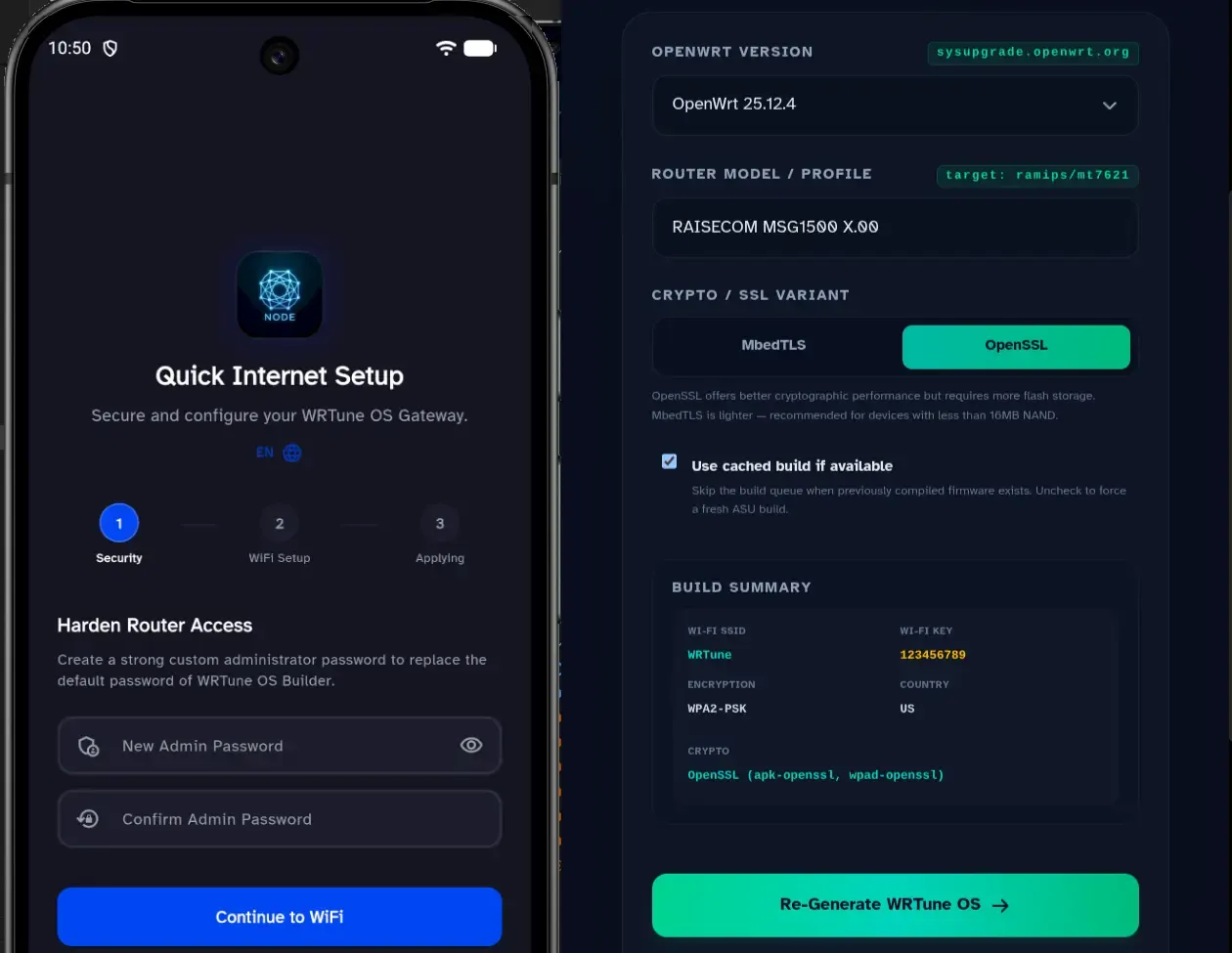
What is WRTune QIS? 🔗
WRTune QIS bridges the gap between the power of open-source firmware and the flawless onboarding experience of modern consumer retail routers.
The problem it solves:
- WiFi is disabled by default on fresh OpenWrt — no wireless access at all
- No
rootpassword set — your router is wide open - Intimidating for newcomers, annoying for pros
Our goal is simple: Bring the best of OpenWrt to advanced users, while making the starting line incredibly easy for newbies.
Instead of navigating the complex menus of LuCI or messing up terminal configuration files on your first boot, WRTune QIS provides a seamless, secure, 3-step wizard stepper directly from your mobile application to configure your gateway.
Out Now in WRTune v2.3.0 (Beta Feature) 🔗
We are thrilled to announce that WRTune QIS is officially baked into our latest production release, WRTune v2.3.0! While the app version is live, the QIS feature itself is currently running in Beta and has been tested on OpenWrt 24.10.x, with primary validation focused on OpenWrt 25.12.4.
To test the QIS setup wizard flow, it requires a custom-built minimal image specifically tailored to handle this initial handshake. You can generate yours directly via our web tool: 👉 Generate Custom OpenWrt Image
In this initial Beta phase, we focused heavily on securing the foundational pillars of your router deployment:
- Step 1: Harden Router Access (Security)
Just like a fresh OpenWrt install, the custom builder image starts with no root password set. The moment the app connects to your router, QIS immediately prompts you to establish a strong, custom administrator (
root) password before the app proceeds to the main menu. - Step 2: WiFi Setup Instantly provision your main wireless network. Type in your custom SSID name, set a secure password, and let WRTune handle the underlying configurations behind the scenes.
- Step 3: Applying Configurations The app automatically syncs, commits, and reloads the wireless and system subsystems without breaking a sweat or risking locking you out.
The Roadmap: What’s Coming Next? 🔗
This is just the tip of the iceberg. As we refine the core engine stabilizer during this Beta phase, we are already working on expanding WRTune QIS to handle full network topology provisioning on the fly.
Here is what we are cooking up next for the setup wizard:
- WAN Internet Configuration Auto-Detection: Easily toggle between standard DHCP, PPPoE (for fiber ISP lines), and static IP routing.
- WISP (Wireless Internet Service Provider) Mode: A dedicated wizard step to help users easily scan and bridge external WiFi networks as their main WAN source—perfect for travel routers or secondary node setups.
Get WRTune Today! 🔗
Ready to upgrade your OpenWrt experience? WRTune v2.3.0 is rolling out right now across mobile platforms. Download it, flash your minimal image, and experience the easiest router setup you’ve ever had.
📱 Download WRTune on Android (Google Play Store)
🍏 Download WRTune on iOS (App Store)
Drop your feedback, bug reports, or feature requests right in our GitHub repository issues section. Let’s make networking accessible to everyone, one step at a time.